← Kembali ke Procurement Management
¶ Introduction
This window helps you to post the discrepancies between inventory and financial accounting of those items for which the corresponding goods receipts were posted.
Above mentioned discrepancies are mainly caused by differences between:
- the item's net unit price registered when booking the purchase order and later on posting the corresponding Goods Receipt
- and the "final" item's net unit price registered when posting the purchase invoice
In the window appears a listing of all invoices that are matched to goods receipts. The matching of the documents is done when documents are created by using the information of the other document: for example by clicking the Generate Invoice from receipt on the goods receipt or by clicking the Create Lines from button when creating a goods receipt to select the invoice.
¶ Matched Invoice
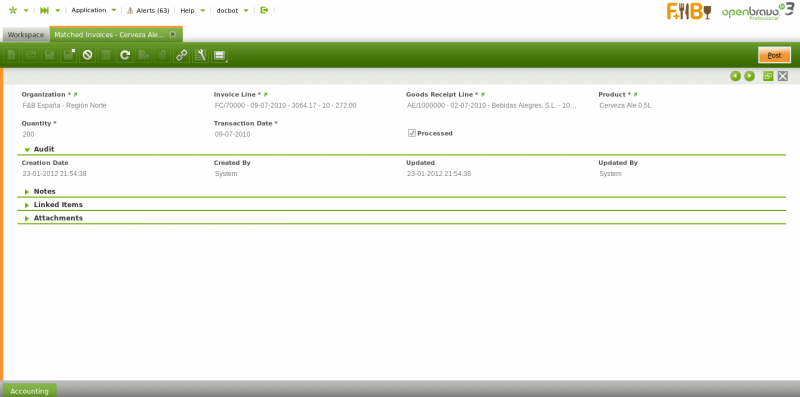
Matched invoice tab lists each invoice line posted linked to the corresponding goods receipt lines, which could also be posted or not.
Matched invoice tab lists each invoice line posted linked to the corresponding goods receipt lines, which could also be posted or not.
There is a "Post" header button which is the one that posts the discrepancies between inventory and financial accounting if any, once the proper line has been selected.
Overall the process to post the discrepancies in accounting is detailed below:
A Matching Invoice document can be posted if the cost of the products included in a Goods Receipt has been calculated. For getting that:
- A validated Costing Rule is required in the Matched Invoice's legal entity
- and the background process Costing Background Process must be run.
In the case of "Expense" product/s do not having the "Sales" checkbox selected, it possible to use the product's purchase price instead of the product's cost whenever the checkbox Book Using Purchase Order Price is selected. In this case it is obviously required that a "Purchase Order" is related to the "Goods Receipt".
Let's take a Goods Receipt of 100 units of a product (set as "Item" type) which does have a calculated cost of 145,00 USD/unit (that is in this example the purchase unit price), however the supplier's invoice is booked with a net unit price of 90,00 USD/unit.
* Post the purchase invoice at the final purchase net unit price
-
[Product Expense](/Product#Accounting)
-
9.000,00
-
Line Net Amount
-
Tax Credit
-
1.620,00
-
Tax Amount
-
Vendor Liability
-
10.620,00
-
Gross Amount
* Post the Goods Receipt
-
[Product Asset](/Product#Accounting)
-
14.500,00
-
Goods Receipt Line cost amount
-
Non-Invoiced Receipts
-
14.500,00
-
Goods Receipt Line cost amount
* Select the proper "Invoice line" and "Goods Receipt line" in the Matched Invoices window, and press the button "Post".
Matched Invoices posting looks like:
-
Non-Invoiced Receipts
-
14.500,00
-
[Product Expense](/Product#Accounting)
-
9.000,00
-
Invoice line net amount at a unit price
-
[Invoice Price Variance](/Product#Accounting)
-
5.500,00
-
Goods Receipt's cost amount - Invoice posting at net unit price
Above posting means that:
- the account Non-Invoiced Receipts is now balanced because the Supplier Invoice has been already received.
- the account [Product Asset](/Product#Accounting) is now adjusted with the correct final value = [9.000,00 = 14.500,00 + 9.000,00 -9.000,00 -5.500,00]
In this example: the [Product Asset](/Product#Accounting) account is the same as the [Product Expense](/Product#Accounting) and the [Invoice Price Variance](/Product#Accounting)
¶ Accounting
Accounting information related to the matched invoices
For more details please review the accounting article.
Full list of Matched Invoices window fields and their descriptions is available in the [Matched Invoices Screen Reference](/Screenshot/Matched_Invoices).